
Formats and completed examples
Thermal Receipt Format
Download blank and worked thermal receipt PDFs in 58 × 190 mm and 80 × 190 mm sizes. Use the long item name and amount lines to check wrapping, margins and your printer’s available width.
People checking how receipt PDFs fit on narrow printer paper.
On this page
At a glance
- The pages use 3 mm side margins: 52 mm content width on the 58 mm file and 74 mm on the 80 mm file.
- A printer’s usable width can be smaller than its paper roll. Check it before choosing print scale.
- These are fixed PDF samples. Physical printing and device compatibility have not been verified.
Download your format
Files are in English. Choose the version you need below.
Blank template (58mm) — PDF
Print-ready fixed document. It has no fillable form fields.
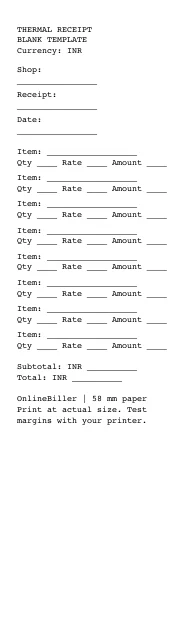 View PDF previewDownload PDF6 KB · 58 × 190 mm · No calculations needed
Worked example (58mm) — PDF
Print-ready fixed document. It has no fillable form fields.
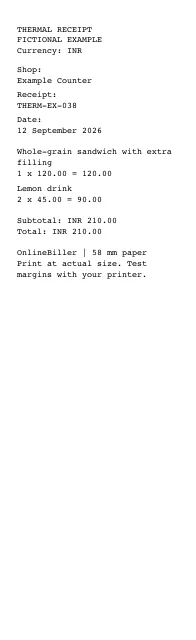 View PDF previewDownload PDF4 KB · 58 × 190 mm · No calculations needed
Blank template (80mm) — PDF
Print-ready fixed document. It has no fillable form fields.
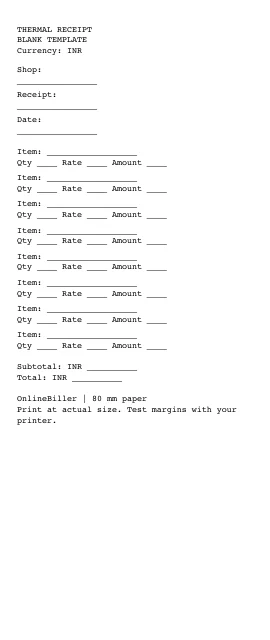 View PDF previewDownload PDF6 KB · 80 × 190 mm · No calculations needed
Worked example (80mm) — PDF
Print-ready fixed document. It has no fillable form fields.
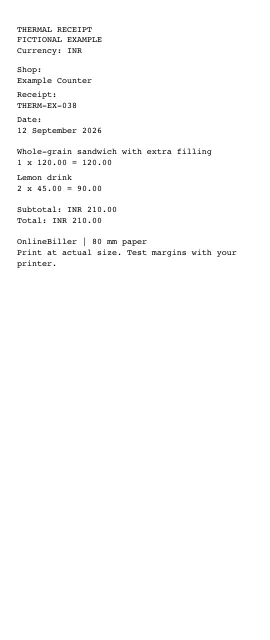 View PDF previewDownload PDF4 KB · 80 × 190 mm · No calculations needed
A completed example
| Description | Quantity | Rate (INR) | Amount (INR) |
|---|---|---|---|
| Whole-grain sandwich with extra filling | 1 | 120.00 | 120.00 |
| Lemon drink | 2 | 45.00 | 90.00 |
Fictional example. Use the figures only to follow the document and calculation.
What to fill in
| Field | What to enter | Example |
|---|---|---|
| Paper width | Match the PDF page width to the roll, then check the printer’s smaller printable area. | 58 mm or 80 mm |
| Item wrapping | Keep a long item on its own readable lines. | Whole-grain sandwich with extra filling |
| Print scale | Start at actual size for inspection. If the content exceeds the device’s printable area, adjust the driver or scaling and check a test print. | Check paper size, printable width and clipping |
| Output | The download is a fixed PDF, not a direct printer command. | No Bluetooth or ESC/POS connection |
Paper width is not printable width
The two PDFs are measured narrow pages with 3 mm margins on each side. A printer may reserve more space: Epson’s TM-T20III guide lists 72 mm of standard printable width on 80 mm paper. The 74 mm content area in this page’s 80 mm sample therefore needs a driver or scaling check on that model; roll width alone does not prove a fit.
Test one page before using a roll
- Open the PDF for the intended roll and select the matching paper size in your printer driver.
- Inspect it at 100% and compare the PDF content width with the printer’s stated printable width.
- If the edges would clip, adjust the driver settings or scale to the printable area, then check the smaller text and changed height.
- Print one test and inspect the long item, amounts and both edges before printing more.
Know the output boundary
These files provide a measured PDF. They do not connect to a Bluetooth/USB printer, emit ESC/POS commands or guarantee compatibility with every device. The generic receipt example does not include a complete GST-invoice field set.
Common questions
Will an 80 mm PDF fit every 80 mm printer?
No. Compare the content width with the device’s printable area and check a test print. Driver margins and scaling affect the result.
Can I edit the item values in the PDF?
No. The PDFs are fixed blank and worked samples with no form fields. They are not an interactive thermal receipt generator.
Sources and further reading
- Epson TM-T20III Technical Reference Guide, Rev. A — Printing specifications, page 77: this model’s printable area is smaller than the paper width. A model-specific example, not a test or endorsement of these PDFs.
Sources checked: .